


How to View a Table in D365FO
To see the raw data table in D365FO, do the following. . .
Install the Chrome Extension in your browser
To add the Chrome extension
How to determine the table name
There are multiple ways to see the table name. Some tables are easy, and some are more difficult to figure out.
Form Name
Sometimes the Form Name and the table name are the same. To get the record info, right-click on a field header > click Form Information > click on the Form Name.

Export
Sometimes you need to export the Form Information to see the table name(s).

Data Source
The other option is to hover over the Data Source.

Script
Another way is to go to Record Info > Script


How to open a table
In the URL, replace everything after the mi=
with this. . .
systablebrowser&tablename=custTable
where custTable is enter the desired table
Note: Depending on the table and the environment, you may be able to edit the table contents.

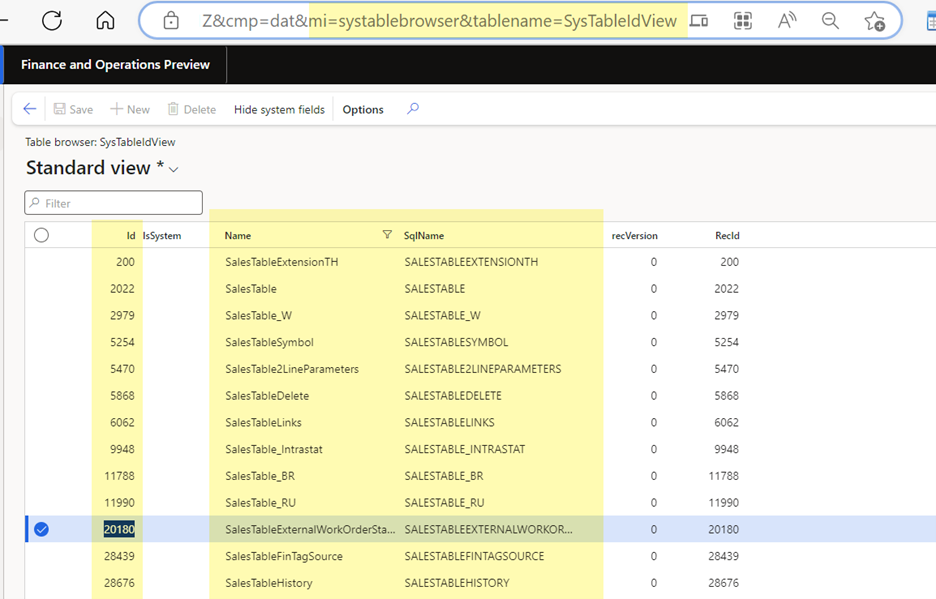
How to get the Table name using the Table ID
If you only have the table number and need to know the table name or the SQLName go to the SysTableIdView and search on the ID.
To advance your consulting skills, let me share my Microsoft Dynamics D365 F&SC expertise with you by signing for my post notifications at www.aliciamvp.com or subscribe to my YouTube Channel @aliciakmvp MVP Contributor ID = ?wt.mc_id=MVP_346423


Comments