


How to post Tax to the Item GL account instead of the Tax Ledger Posting Group
Thought of the Day: AI can master intelligence, but intelligence is not wisdom. The translation of “homo sapiens” is not “intelligent human.” It is “wise human.” As writer and biochemist Isaac Asimov said, “The saddest aspect of life right now is that science gathers knowledge faster than society gathers wisdom.” - Arianna Huffington
Tip of the Day: Are you adding a “Sales Tax” line to purchase orders to post tax to the item’s General Ledger account? With a quick setup in D365 Finance and Supply Chain Management, you can eliminate that line and have the system post the tax amount directly to the item’s General Ledger account.
Until next time, keep your head in the cloud, and keep working wise!
To post the to the Item GL account instead of the Tax Ledger Posting Group, go to General Ledger Parameters > Sales Tax > set the Apply Sales Tax Taxation Rules = No.

By setting the Apply Sales Tax Taxation Rules = No, when you go to the Sale Tax Code > Values, you will see a new field.

The new field is the Non Deductible %.

Note: When I did the testing, if the Non Deductible % was not set to 100%, I got this error.
Posting - Number: AK TEST1 - The state of the source document or source document line could not be updated.

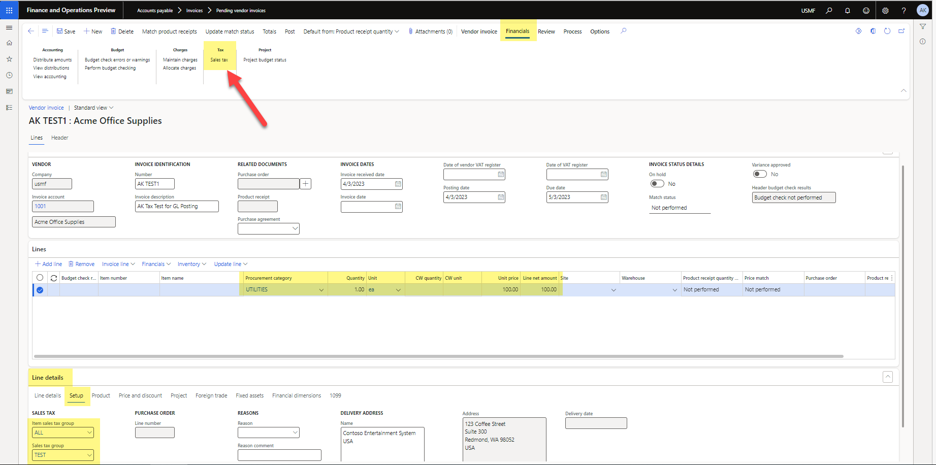
I added the new Tax Code up on a Sale Tax Group. . .

And on the Item Sales Tax Group

I created a new Pending Vendor Invoice and Posted.
Here are the vouchers. We can see that the Tax was posted to the same GL account as the line item on the invoice instead of to the Tax Ledger Posting Group.

To advance your consulting skills, let me share my Microsoft Dynamics D365 F&SC expertise with you by signing for my post notifications at www.aliciamvp.com or subscribe to my YouTube Channel @aliciakmvp MVP Contributor ID = ?wt.mc_id=MVP_346423

Comments